
SpringMVC 学习笔记
1. SpringMVC概述
MVC
- MVC全名是Model View Controller,是==模型(model)==-==视图(view)==-==控制器(controller)==的缩写,一种软件设计典范,用一种业务逻辑、数据、界面显示分离的方法组织代码,将业务逻辑聚集到一个部件里面,在改进和个性化定制界面及用户交互的同时,不需要重新编写业务逻辑。MVC被独特的发展起来用于映射传统的输入、处理和输出功能在一个逻辑的图形化用户界面的结构中。
- **Model(模型)**是应用程序中用于处理应用程序数据逻辑的部分,通常模型对象负责在数据库中存取数据。
- **View(视图)**是应用程序中处理数据显示的部分,通常视图是依据模型数据创建的。
- **Controller(控制器)**是应用程序中处理用户交互的部分,通常控制器负责从视图读取数据,控制用户输入,并向模型发送数据。
2. 环境搭建
-
建立maven web工程

-
引入pom依赖
1
2
3
4
5
6
7
8
9
10
11
12
13
14
15
16
17
18
19
20
21
22
23
24
25
26
27
28
29
30
31
32
33
<!-- 版本控制 -->
<properties>
<spring.version>5.2.7.RELEASE</spring.version>
<tomcat.version>9.0.26</tomcat.version>
<junit.version>5.7.0-M1</junit.version>
</properties>
<dependencies>
<!-- spring-webmvc -->
<dependency>
<groupId>org.springframework</groupId>
<artifactId>spring-webmvc</artifactId>
<version>${spring.version}</version>
</dependency>
<!-- tomcat-jsp-api -->
<dependency>
<groupId>org.apache.tomcat</groupId>
<artifactId>tomcat-jsp-api</artifactId>
<version>${tomcat.version}</version>
</dependency>
<!-- tomcat-servlet-api -->
<dependency>
<groupId>org.apache.tomcat</groupId>
<artifactId>tomcat-servlet-api</artifactId>
<version>${tomcat.version}</version>
</dependency>
<!-- junit-jupiter-api -->
<dependency>
<groupId>org.junit.jupiter</groupId>
<artifactId>junit-jupiter-api</artifactId>
<version>${junit.version}</version>
</dependency>
</dependencies> -
在web.xml配置文件中配置核心控制器DispatcherServlet
1
2
3
4
5
6
7
8
9
10
11
12
13
14
15
16
17
18
19
20
21
22
23
24
<web-app xmlns="http://xmlns.jcp.org/xml/ns/javaee"
xmlns:xsi="http://www.w3.org/2001/XMLSchema-instance"
xsi:schemaLocation="http://xmlns.jcp.org/xml/ns/javaee
http://xmlns.jcp.org/xml/ns/javaee/web-app_4_0.xsd"
version="4.0">
<!--1.注册servlet-->
<servlet>
<servlet-name>DispatcherServlet</servlet-name>
<servlet-class>org.springframework.web.servlet.DispatcherServlet</servlet-class>
<!--通过初始化参数指定SpringMVC配置文件的位置,进行关联-->
<init-param>
<param-name>contextConfigLocation</param-name>
<param-value>classpath:springmvc.xml</param-value>
</init-param>
<!-- 启动顺序,数字越小,启动越早 -->
<load-on-startup>1</load-on-startup>
</servlet>
<!--所有请求都会被springmvc拦截 -->
<servlet-mapping>
<servlet-name>DispatcherServlet</servlet-name>
<url-pattern>/</url-pattern>
</servlet-mapping>
</web-app> -
编写配置文件springmvc.xml
1
2
3
4
5
6
7
8
9
10
11
12
13
14
15
16
17
18
19
20
21
22
23
24
<beans xmlns="http://www.springframework.org/schema/beans"
xmlns:mvc="http://www.springframework.org/schema/mvc"
xmlns:context="http://www.springframework.org/schema/context"
xmlns:xsi="http://www.w3.org/2001/XMLSchema-instance"
xsi:schemaLocation="
http://www.springframework.org/schema/beans
http://www.springframework.org/schema/beans/spring-beans.xsd
http://www.springframework.org/schema/mvc
http://www.springframework.org/schema/mvc/spring-mvc.xsd
http://www.springframework.org/schema/context
http://www.springframework.org/schema/context/spring-context.xsd">
<!-- 配置spring创建容器时要扫描的包 -->
<context:component-scan base-package="com.naclo"/>
<!-- 配置SpringMVC不处理静态资源 -->
<mvc:default-servlet-handler/>
<!-- 配置视图解析器 -->
<bean id="viewResolver" class="org.springframework.web.servlet.view.InternalResourceViewResolver">
<property name="prefix" value="/page/"/>
<property name="suffix" value=".jsp"/>
</bean>
<!-- 配置spring开启注解mvc的支持-->
<mvc:annotation-driven/>
</beans> -
编写控制类com.naclo.controller.HelloController.java
1
2
3
4
5
6
7
8
9
10
11
public class HelloController {
//真实访问地址 : 项目名/HelloController/hello
public String hello(Model model) {
//向模型中添加属性msg与值,可以在JSP页面中取出并渲染
model.addAttribute("msg", "hello,SpringMVC");
return "hello";
}
} -
编写页面page/hello.jsp
1
2
3
4
5
6
7
8
9
<%@ page contentType="text/html;charset=UTF-8" language="java" %>
<html>
<head>
<title>SpringMVC</title>
</head>
<body>
${msg}
</body>
</html> -
运行测试
-
访问:
http://localhost:8080/HelloController/hello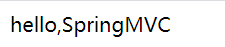
-
本博客所有文章除特别声明外,均采用 CC BY-NC-SA 4.0 许可协议。转载请注明来源 NaClO's Blog!
评论